<?xml version="1.0" encoding="utf-8"?><feed xmlns="http://www.w3.org/2005/Atom" ><generator uri="https://jekyllrb.com/" version="3.9.2">Jekyll</generator><link href="https://infotexture.net/feed.xml" rel="self" type="application/atom+xml" /><link href="https://infotexture.net/" rel="alternate" type="text/html" /><updated>2024-02-04T22:25:21+01:00</updated><id>https://infotexture.net/feed.xml</id><title type="html">infotexture</title><subtitle>Information Architecture &amp;amp; Content Design Operations</subtitle><author><name>Roger Sheen</name></author><entry><title type="html">Publishing DITA with MkDocs Material</title><link href="https://infotexture.net/2023/04/publishing-dita-markdown-with-mkdocs-material/" rel="alternate" type="text/html" title="Publishing DITA with MkDocs Material" /><published>2023-04-14T12:11:11+02:00</published><updated>2023-11-12T21:09:10+01:00</updated><id>https://infotexture.net/2023/04/publishing-dita-markdown-with-mkdocs-material</id><content type="html" xml:base="https://infotexture.net/2023/04/publishing-dita-markdown-with-mkdocs-material/"><![CDATA[<p>Back in December of 2021, Radu Coravu posted an article on the <code class="language-plaintext highlighter-rouge">&lt;oXygen/&gt;</code> blog about <a href="https://blog.oxygenxml.com/topics/publishing_dita_content_using_a_markdown_static_web_site_generator.html">Publishing DITA Content Using the MKDocs Web Site Generator</a>.</p>

<p>As Radu explains, <a href="https://www.mkdocs.org">MkDocs</a> is a static site generator that makes it easy to publish a documentation website from a folder of <a href="https://daringfireball.net/projects/markdown/">Markdown</a> files. His post shows how to install MkDocs, create a new project, and publish a simple DITA map via an oXygen transformation scenario.</p>

<p>With Radu’s approach, the DITA map file is first converted to a Markdown file, which is exported to HTML and then transformed via an XSLT stylesheet to the YAML format that defines the navigation structure of the MkDocs site.</p>

<p>This works well enough for simple maps like the oXygen <code class="language-plaintext highlighter-rouge">flowers</code> sample (and in cases where manual steps are acceptable), but there are a few constraints that limit the utility of this process in larger projects and automated publishing scenarios.</p>

<p>This post explores how to work around those contraints and add local search to the site using additional resources from the MkDocs ecosystem, which have improved significantly since Radu first proposed this workflow.</p>

<h2 id="mkdocs-caveats">MkDocs caveats</h2>

<p>MkDocs is a great way to spin up a simple site from a handful of Markdown files, but there’s one limitation that can be a show-stopper in larger projects — <strong>you can’t nest topics in the navigation</strong>.</p>

<p>Out of the box, the MkDocs navigation only supports unlinked section headings (groups) and pages. There’s no way to nest pages that include editorial content in a hierarchy of parent/child link relationships.</p>

<blockquote>
  <p>Note that a section cannot have a page assigned to it.  <br />
Sections are only containers for child pages and sub-sections.  <br />
<br />
<a href="https://www.mkdocs.org/user-guide/writing-your-docs">mkdocs.org/user-guide/writing-your-docs</a></p>
</blockquote>

<p>This is fine for small doc sets with flat structures, but less suitable for deeper information hierarchies commonly modeled in DITA publications.</p>

<h3 id="navigation-limitations">Navigation limitations</h3>

<p>MkDocs can be configured to create navigation sections automatically based on the subfolder names in the <code class="language-plaintext highlighter-rouge">docs</code> directory, but in typical DITA projects with folders like <code class="language-plaintext highlighter-rouge">concept</code>, <code class="language-plaintext highlighter-rouge">task</code>, and <code class="language-plaintext highlighter-rouge">reference</code>, that might not be welcome or useful. Unless the source file structure was explicitly designed for the desired navigation structure, there’s little value in showing folders in the table of contents (ToC) in the navigation sidebar.</p>

<p>In DITA projects, maps facilitate abstraction and re-use and allow us to create multiple navigation structures from a single set of files, so binding the file structure to the ToC is often counterproductive.</p>

<h3 id="avoiding-dead-ends">Avoiding dead ends</h3>

<p>Although the DITA specification includes the <code class="language-plaintext highlighter-rouge">&lt;topichead&gt;</code> element to create a parent node in the hierarchy without a corresponding topic, it can be confusing if some links open topics, and others don’t.</p>

<p>Many teams and style guides discourage the use of topic heads to avoid unlinked navigation nodes. For a consistent experience, every navigation item should open a new page.</p>

<p>— <em>So how can we implement this with MkDocs?</em></p>

<h2 id="using-the-material-theme">Using the Material theme</h2>

<p>The <a href="https://squidfunk.github.io/mkdocs-material">Material theme for MkDocs</a> is one of the most popular open-source themes for documentation sites, and the best-known MkDocs theme by far.</p>

<p>With over 200,000 downloads per month, the theme is widely used and well-maintained by Martin Donath (<a href="https://github.com/squidfunk/">@squidfunk</a>), who put thousands of hours into the project. The <a href="https://github.com/squidfunk/mkdocs-material">mkdocs-material</a> repository has a long history of over 300 releases, and more than 5000 commits by nearly 250 contributors.</p>

<p>With support for 40-odd languages, the theme includes a broad range of documentation-specific features such as page ToCs, versioning, anchor links, and robust mobile support.</p>

<p>Many developers already use <em>Material for MkDocs</em> to build docs sites for their projects. Thanks to the Markdown export features in Jarno Elovirta’s <a href="https://github.com/jelovirt/org.lwdita">Lightweight DITA</a> plugin for <a href="https://www.dita-ot.org">DITA Open Toolkit</a>, we can easily integrate content authored in DITA to sites like this without spending any money on proprietary portal software or services.</p>

<p><em>But how does this solve our ToC problem?</em></p>

<h3 id="section-index-pages">Section index pages</h3>

<p><em>Material for MkDocs</em> includes an option to enable <a href="https://squidfunk.github.io/mkdocs-material/setup/setting-up-navigation/#section-index-pages">section index pages</a>, so if you have a topic that serves as a landing page for a group of related topics, you can link to the content from the navigation section.</p>

<p>Here’s an example based on the structure of the <a href="https://www.dita-ot.org/dev/">DITA Open Toolkit documentation</a>:</p>

<div class="language-yaml highlighter-rouge"><div class="highlight"><pre class="highlight"><code><span class="na">theme</span><span class="pi">:</span>
  <span class="na">name</span><span class="pi">:</span> <span class="s">material</span>
  <span class="na">features</span><span class="pi">:</span>
    <span class="pi">-</span> <span class="s">navigation.indexes</span>

<span class="na">nav</span><span class="pi">:</span>
  <span class="pi">-</span> <span class="s1">'</span><span class="s">DITA</span><span class="nv"> </span><span class="s">Open</span><span class="nv"> </span><span class="s">Toolkit</span><span class="nv"> </span><span class="s">4.0'</span><span class="err">:</span> <span class="s1">'</span><span class="s">index.md'</span>
  <span class="pi">-</span> <span class="s1">'</span><span class="s">Release</span><span class="nv"> </span><span class="s">Notes'</span><span class="err">:</span>
    <span class="pi">-</span> <span class="s1">'</span><span class="s">release-notes/index.md'</span>
    <span class="pi">-</span> <span class="s1">'</span><span class="s">Release</span><span class="nv"> </span><span class="s">history'</span><span class="err">:</span> <span class="s1">'</span><span class="s">topics/release-history.md'</span>
</code></pre></div></div>

<p>The <code class="language-plaintext highlighter-rouge">navigation.indexes</code> option in the theme <code class="language-plaintext highlighter-rouge">features</code> key enables the section index pages, so links to <code class="language-plaintext highlighter-rouge">index</code> files in subfolders open the corresponding topics. In this example, the <em>Release Notes</em> entry in the ToC is linked to the contents of the <code class="language-plaintext highlighter-rouge">release-notes/index.md</code> file, and the <em>Release history</em> topic appears as a child topic inside the <em>Release Notes</em> node.</p>

<p>— But as the name foretells, it only works for topics whose filenames are literally <code class="language-plaintext highlighter-rouge">index</code>. You can’t use arbitrary page names as section landing pages. Links to <code class="language-plaintext highlighter-rouge">folder/index.md</code> will work, but <code class="language-plaintext highlighter-rouge">folder/other-filename.md</code> won’t.</p>

<p>A <a href="https://github.com/mkdocs/mkdocs/pull/1042">proposal</a> was submitted to the MkDocs project to relax this constraint and allow any page name to be defined as a section index, but the maintainers were reluctant to add this implementation to the Material theme, or to MkDocs itself.</p>

<p><em>So what can we do?</em></p>

<h3 id="other-pages-as-section-indexes">Other pages as section indexes</h3>

<p>Fortunately, in plugin-based ecosystems like DITA-OT or MkDocs, maintainers don’t need to support every edge case in the core project.</p>

<p>Those who need additional features can create custom plugins to extend processing without asking permission or increasing complexity for others who don’t need the extra code.</p>

<p>The <a href="https://github.com/oprypin/mkdocs-section-index">mkdocs-section-index</a> plugin was created based on the earlier proposal, and extends the Material theme implementation to enable section landing pages with arbitrary names.</p>

<p>To use the plugin, first install it via <code class="language-plaintext highlighter-rouge">pip</code>:</p>

<div class="language-shell highlighter-rouge"><div class="highlight"><pre class="highlight"><code>pip <span class="nb">install </span>mkdocs-section-index
</code></pre></div></div>

<p>and then add it to the <code class="language-plaintext highlighter-rouge">plugins</code> key in the MkDocs configuration file:</p>

<div class="language-yaml highlighter-rouge"><div class="highlight"><pre class="highlight"><code><span class="na">plugins</span><span class="pi">:</span>
  <span class="pi">-</span> <span class="s">search</span>
  <span class="pi">-</span> <span class="s">section-index</span>
</code></pre></div></div>

<p>With this setup, we can extend the previous example by linking to additional landing pages with other names:</p>

<div class="language-yaml highlighter-rouge"><div class="highlight"><pre class="highlight"><code><span class="na">nav</span><span class="pi">:</span>
  <span class="pi">-</span> <span class="s1">'</span><span class="s">DITA</span><span class="nv"> </span><span class="s">Open</span><span class="nv"> </span><span class="s">Toolkit</span><span class="nv"> </span><span class="s">4.0'</span><span class="err">:</span> <span class="s1">'</span><span class="s">index.md'</span>
  <span class="pi">-</span> <span class="s1">'</span><span class="s">Release</span><span class="nv"> </span><span class="s">Notes'</span><span class="err">:</span>
    <span class="pi">-</span> <span class="s1">'</span><span class="s">release-notes/index.md'</span>
    <span class="pi">-</span> <span class="s1">'</span><span class="s">Release</span><span class="nv"> </span><span class="s">history'</span><span class="err">:</span> <span class="s1">'</span><span class="s">topics/release-history.md'</span>
  <span class="pi">-</span> <span class="s1">'</span><span class="s">Installing</span><span class="nv"> </span><span class="s">DITA-OT'</span><span class="err">:</span>
    <span class="pi">-</span> <span class="s1">'</span><span class="s">topics/installing-client.md'</span>
</code></pre></div></div>

<p>The <strong>Installing DITA-OT</strong> ToC entry now links as intended to <code class="language-plaintext highlighter-rouge">/topics/installing-client/</code>.</p>

<p>This plugin replaces the section index pages feature from the Material theme, so we can remove that entry in the configuration:</p>

<div class="language-diff highlighter-rouge"><div class="highlight"><pre class="highlight"><code><span class="p">theme:
</span>  name: material
<span class="gd">- features:
-   - navigation.indexes
</span></code></pre></div></div>

<h3 id="generating-navigation-from-maps">Generating navigation from maps</h3>

<p>We don’t want to maintain the navigation structure in the MkDocs configuration file by hand when it’s already in the DITA map. We can read it directly from the output generated by DITA Open Toolkit.</p>

<p>The Lightweight DITA plugin is already capable of converting the map structure to a format that can be used with Markdown-based publishing environments like <a href="https://www.gitbook.com">GitBook</a> or <a href="https://rust-lang.github.io/mdBook/">mdBook</a>, which define the ToC structure in a <code class="language-plaintext highlighter-rouge">SUMMARY.md</code> file.</p>

<p>To publish GitHub-Flavored Markdown and generate this file, use the <code class="language-plaintext highlighter-rouge">markdown_gitbook</code> transtype:</p>

<div class="language-shell highlighter-rouge"><div class="highlight"><pre class="highlight"><code>dita <span class="nt">--input</span><span class="o">=</span>input-file <span class="nt">--format</span><span class="o">=</span>markdown_gitbook
</code></pre></div></div>

<h3 id="using-the-gitbook-output">Using the GitBook output</h3>

<p>With the <code class="language-plaintext highlighter-rouge">SUMMARY.md</code> file from the toolkit’s GitBook output, there’s no need to define the navigation hierarchy in the MkDocs configuration file.</p>

<p>The <code class="language-plaintext highlighter-rouge">mkdocs-literate-nav</code> plugin can read the GitBook summary file for the navigation. As before, we first install the plugin via <code class="language-plaintext highlighter-rouge">pip</code>:</p>

<div class="language-shell highlighter-rouge"><div class="highlight"><pre class="highlight"><code>pip <span class="nb">install </span>mkdocs-literate-nav
</code></pre></div></div>

<p>then add it to the MkDocs configuration file, and tell it which file contains the ToC hierarchy:</p>

<div class="language-diff highlighter-rouge"><div class="highlight"><pre class="highlight"><code><span class="p">plugins:
</span>  - search
  - section-index
<span class="gi">+ - literate-nav:
+    nav_file: SUMMARY.md
</span></code></pre></div></div>

<h2 id="local-search-out-of-the-box">Local search out of the box</h2>

<p>One of the main reasons so many teams publish their documentation with <em>Material for MkDocs</em> is that it includes client-side search.</p>

<p>Whenever the MkDocs <code class="language-plaintext highlighter-rouge">build</code> or <code class="language-plaintext highlighter-rouge">serve</code> processes run, the local search index is automatically updated to reflect any changes in the Markdown source files.</p>

<p>This setup provides a viable open-source alternative to commercial webhelp solutions, and may be all you need for your own docs server.</p>

<p>In contrast to online search solutions that require a network connection to query the index, the MkDocs search works completely offline, so it can be used to build sites for secure environments and other scenarios where network access is not available.</p>

<p class="notice--info"><strong>Note:</strong> The search feature is currently based on <a href="https://lunrjs.com">Lunr.js</a>, but Martin Donath is <a href="https://github.com/squidfunk/mkdocs-material/issues/6307">revisiting this approach</a>, and plans to improve the search features in an upcoming version of <em>Material for MkDocs</em>.</p>

<p>If you’d like to support Martin’s work on the project, consider <a href="https://github.com/sponsors/squidfunk">sponsoring him on GitHub</a>, or subscribing to the <a href="https://squidfunk.github.io/mkdocs-material/insiders">insiders</a> version, which provides early access to new features, and helps secure the future of the project with a sponsorware release strategy.</p>

<h2 id="demo-sites">Demo sites</h2>

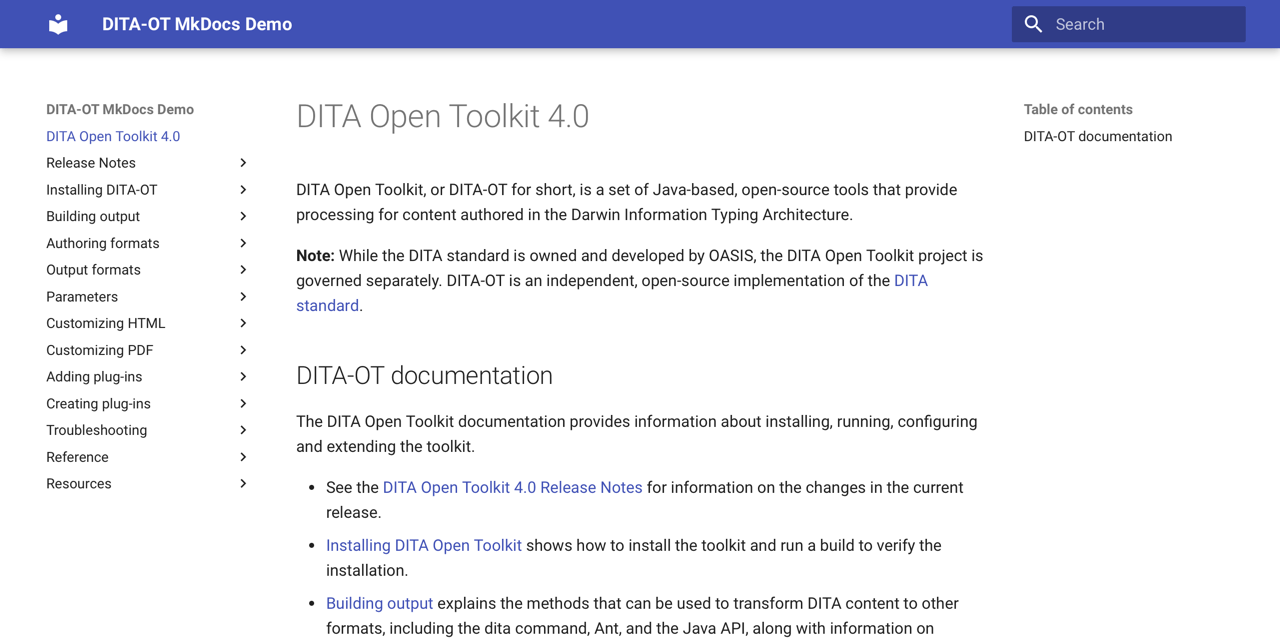
<p>If you’d like to see the results of the approach outlined in this article, I built a demo site using the contents of the <a href="https://www.dita-ot.org/dev/">DITA Open Toolkit docs</a>.</p>

<p>The demonstration output is available on the GitHub project site at <a href="https://infotexture.github.io/ot-mkdocs-demo">infotexture.github.io/ot-mkdocs-demo</a>, and hosted in the GitHub repository at <a href="https://github.com/infotexture/ot-mkdocs-demo">infotexture/ot-mkdocs-demo</a>.</p>

<figure class=" ">
  
    
      <a href="https://infotexture.github.io/ot-mkdocs-demo/">
          <img src="/assets/images/mkdocs-material-demo.png" alt="MkDocs Material demo site" />
      </a>


    <figcaption>MkDocs Material demo site
</figcaption>
  
</figure>

<p>The content was generated from the <a href="https://github.com/dita-ot/docs/tree/4.0.2">DITA-OT 4.0.2 docs</a> as hosted on the <em>DITA Open Toolkit</em> project website at <a href="https://www.dita-ot.org/4.0/">www.dita-ot.org/4.0/</a>.</p>

<p>The repository includes a basic <a href="https://github.com/infotexture/ot-mkdocs-demo/blob/master/.github/workflows/ci.yaml">continuous integration setup</a> that automatically publishes any content changes via <a href="https://github.com/features/actions">GitHub Actions</a>. You can borrow this setup to automate your own MkDocs publishing processes.</p>

<p class="notice--info"><strong>Note:</strong> I published a <a href="https://infotexture.github.io/ot-docs-mdbook">similar demo with GitBook output</a> a few years ago, but never got around to writing about it. If you’re curious, you’ll find the repository at <a href="https://github.com/infotexture/ot-docs-mdbook">infotexture/ot-docs-mdbook</a>.</p>]]></content><author><name>Roger</name></author><category term="DITA" /><category term="DITA" /><category term="DITA-OT" /><category term="MkDocs" /><category term="Markdown" /><category term="Material" /><summary type="html"><![CDATA[Converting DITA content to Markdown and publishing the output with the Material theme for MkDocs.]]></summary></entry><entry><title type="html">DITA Bootstrap⁴ plug-in</title><link href="https://infotexture.net/2019/03/dita-bootstrap-plugin/" rel="alternate" type="text/html" title="DITA Bootstrap⁴ plug-in" /><published>2019-03-07T16:05:00+01:00</published><updated>2019-03-07T16:05:00+01:00</updated><id>https://infotexture.net/2019/03/dita-bootstrap-plugin</id><content type="html" xml:base="https://infotexture.net/2019/03/dita-bootstrap-plugin/"><![CDATA[<p>At DITA Europe in Rotterdam last fall, I spoke about producing custom output with DITA Open Toolkit and suggested that “<a href="https://infotexture.net/2018/11/customizing-dita-output/">Customizing DITA output isn’t as hard as you may think</a>”:</p>

<blockquote>
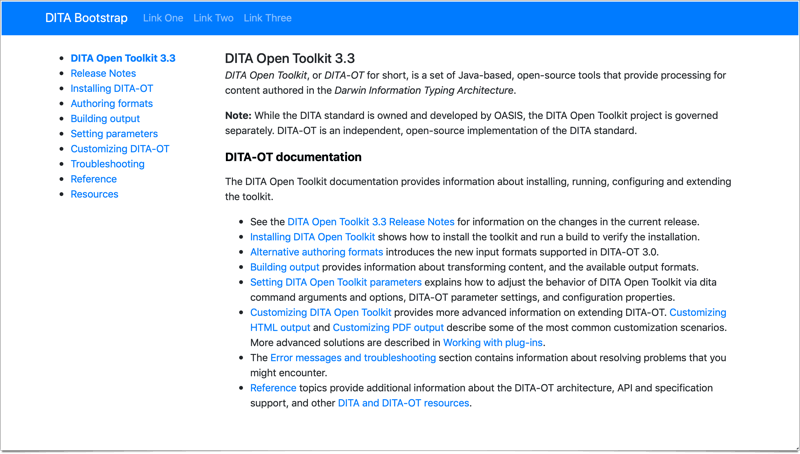
  <p>The highlight of the presentation was the announcement of my new “DITA Bootstrap” plug-in for DITA-OT 3.2, which generates HTML5 output with a basic Bootstrap template that includes responsive grid layout, global navigation menu and a table-of-contents sidebar.</p>
</blockquote>

<h2 id="-dita-33-updates">✨ DITA 3.3 Updates</h2>

<p>Since the initial release of the plug-in, <a href="https://www.dita-ot.org/3.3/release-notes/#v3.3">DITA-OT 3.3</a> has been released with new attribute sets that simplify these sorts of customizations to the default HTML5 output.</p>

<p>Where the old version required over 50 lines of code to override several templates, the <a href="https://github.com/infotexture/dita-bootstrap">new version of the DITA Bootstrap plug-in</a> achieves the same result in <a href="https://github.com/infotexture/dita-bootstrap/commit/e19d89e7">8 lines</a> that add a few custom classes to the default attribute sets.</p>

<!-- https://twitter.com/infotexture/status/1103691542240350208 -->

<p><img src="/assets/images/dita-bootstrap-default-screenshot.png" alt="DITA Bootstrap plug-in" title="DITA Bootstrap plug-in" /></p>

<h2 id="-bootstrap-4">✨ Bootstrap 4</h2>

<p>With the new plug-in version, the <a href="https://getbootstrap.com">Bootstrap</a> references have been updated to use the latest version of the framework (4.3.1), which includes significant enhancements to responsive design components, flexbox support, an improved grid system, and new Sass variables that simplify theming.</p>

<h2 id="installing">Installing</h2>

<p>You can install DITA Bootstrap from the <a href="https://infotexture.net/2018/11/new-dita-ot-plugin-registry/">plug-in registry</a> at <a href="https://www.dita-ot.org/plugins">dita-ot.org/plugins</a> with the <code class="language-plaintext highlighter-rouge">dita</code> command:</p>

<div class="language-bash highlighter-rouge"><div class="highlight"><pre class="highlight"><code>dita <span class="nt">--install</span> net.infotexture.dita-bootstrap
</code></pre></div></div>

<h2 id="building-output">Building output</h2>

<p>Specify the <code class="language-plaintext highlighter-rouge">html5-bootstrap</code> format when building output with the <code class="language-plaintext highlighter-rouge">dita</code> command:</p>

<div class="language-bash highlighter-rouge"><div class="highlight"><pre class="highlight"><code>dita <span class="nt">--input</span><span class="o">=</span>path/to/your.ditamap <span class="nt">--format</span><span class="o">=</span>html5-bootstrap
</code></pre></div></div>

<h2 id="customizing">Customizing</h2>

<h3 id="header-menu">Header menu</h3>

<p>The plug-in includes a default static navbar with a project name and global links. To override the global navigation with a header of your own, pass a custom header file to the <code class="language-plaintext highlighter-rouge">dita</code> command via the <code class="language-plaintext highlighter-rouge">--args.hdr</code> parameter:</p>

<div class="language-bash highlighter-rouge"><div class="highlight"><pre class="highlight"><code>dita <span class="nt">--input</span><span class="o">=</span>path/to/your.ditamap <span class="nt">--format</span><span class="o">=</span>html5-bootstrap <span class="se">\</span>
     <span class="nt">--args</span>.hdr<span class="o">=</span>path/to/your-header.xml
</code></pre></div></div>

<p>The plug-in includes a sample <a href="https://github.com/infotexture/dita-bootstrap/blob/master/includes/bs-navbar-inverse.hdr.xml">header alternative with a dark navbar</a>.</p>

<p>Edit a copy of this file to adjust the content of the global navigation.</p>

<h3 id="custom-css">Custom CSS</h3>

<p>The plug-in includes a basic placeholder for <a href="https://github.com/infotexture/dita-bootstrap/blob/master/css/custom.css">custom CSS</a> styles. You can edit this file to add style rules of your own, or override it by passing a custom CSS file to the <code class="language-plaintext highlighter-rouge">dita</code> command via the <code class="language-plaintext highlighter-rouge">--args.css</code> parameter:</p>

<div class="language-bash highlighter-rouge"><div class="highlight"><pre class="highlight"><code>dita <span class="nt">--input</span><span class="o">=</span>path/to/your.ditamap <span class="nt">--format</span><span class="o">=</span>html5-bootstrap <span class="se">\</span>
     <span class="nt">--args</span>.hdr<span class="o">=</span>path/to/your-header.xml <span class="se">\</span>
     <span class="nt">--args</span>.css<span class="o">=</span>path/to/your.css
</code></pre></div></div>

<p>For more extensive customizations, you may want to <a href="https://help.github.com/articles/fork-a-repo/">fork</a> the repository and create a new plug-in of your own.</p>]]></content><author><name>Roger</name></author><category term="DITA" /><category term="DITA" /><category term="DITA-OT" /><category term="Plugins" /><category term="Bootstrap" /><summary type="html"><![CDATA[The latest version of my Bootstrap plug-in for DITA Open Toolkit 3.3 generates HTML5 output with a Bootstrap 4 styling base.]]></summary></entry><entry><title type="html">Lightweight DITA Committee Note № 2</title><link href="https://infotexture.net/2018/12/oasis-lwdita-committee-note/" rel="alternate" type="text/html" title="Lightweight DITA Committee Note № 2" /><published>2018-12-06T18:18:18+01:00</published><updated>2018-12-06T18:18:18+01:00</updated><id>https://infotexture.net/2018/12/oasis-lwdita-committee-note</id><content type="html" xml:base="https://infotexture.net/2018/12/oasis-lwdita-committee-note/"><![CDATA[<p><img src="/assets/images/oasis-logo.png" alt="OASIS logo" title="The Organization for the Advancement of Structured Information Standards" /></p>

<p>Today the members of the <a href="https://www.oasis-open.org/committees/dita/">OASIS Darwin Information Typing Architecture (DITA) TC</a> announced the publication of the second version of their Committee Note <a href="https://www.oasis-open.org/news/announcements/lightweight-dita-an-introduction-cn02-published-by-dita-tc">“Lightweight DITA: An Introduction”</a>:</p>

<blockquote>
  <p>Lightweight DITA (LwDITA) is a simplified version of the Darwin Information Typing Architecture (DITA). In comparison to DITA 1.3, it has a smaller element type and attribute set, stricter content models, and a reduced feature set. It also defines mappings between XML, HTML5, and Markdown so that authors can collaborate and publish across different markup languages.</p>
</blockquote>

<p>In the <a href="http://docs.oasis-open.org/dita/LwDITA/v1.0/cn02/LwDITA-v1.0-cn02.html#ariaid-title4">references</a> section, the <em>Committee Note</em> links to <a href="https://infotexture.net/2015/04/dita-ot-markdown-plugin/">Marking Down DITA</a>, my 2015 article on the rise of Markdown as an alternative input method for DITA projects.</p>

<p>As I wrote later in <a href="https://infotexture.net/2017/11/dita-ot-v3-markdown-support/">DITA-OT³ Markdown Support</a>:</p>

<blockquote>
  <p>That post provided background information for people who are new to the concept of <a href="https://en.wikipedia.org/wiki/Lightweight_markup_language">lightweight markup languages</a> and how they relate to more structured authoring formats like DITA.</p>

  <p>— But that was years ago, and a lot has happened since then…</p>

  <p>At this year’s DITA Europe conference in Berlin, I gave a follow-up talk that explained how DITA Open Toolkit 3.0 supports Markdown out-of-the-box along with the alternative authoring formats proposed for Lightweight DITA.</p>
</blockquote>

<p>For more information on publishing with Markdown/DITA workflows, see <a href="https://infotexture.net/2017/11/dita-ot-v3-markdown-support/">DITA-OT³ Markdown Support</a>.</p>]]></content><author><name>Roger</name></author><category term="DITA" /><category term="DITA" /><category term="LwDITA" /><category term="Markdown" /><summary type="html"><![CDATA[The OASIS Darwin Information Typing Architecture (DITA) TC announced a new version of their Committee Note “Lightweight DITA: An Introduction”.]]></summary></entry><entry><title type="html">Customizing DITA output</title><link href="https://infotexture.net/2018/11/customizing-dita-output/" rel="alternate" type="text/html" title="Customizing DITA output" /><published>2018-11-05T11:11:11+01:00</published><updated>2018-11-05T11:11:11+01:00</updated><id>https://infotexture.net/2018/11/customizing-dita-output-talk</id><content type="html" xml:base="https://infotexture.net/2018/11/customizing-dita-output/"><![CDATA[<p>Earlier today at <a href="https://ditaeurope.infomanagementcenter.com">DITA Europe</a> in Rotterdam, I spoke about producing custom output with <a href="https://www.dita-ot.org">DITA Open Toolkit</a> and suggested:</p>

<figure class="">
  <img src="/assets/images/customizing-dita-output_520.png" alt="“Customizing DITA output isn’t as hard as you may think”" /><figcaption>
      DITA Europe 2018 presentation

    </figcaption></figure>

<p>The title was clearly a bit provocative, as many people <em>do</em> find tweaking default output tricky — but my point was that this has gotten easier and depending on what you need to change, you may find it’s not nearly as hard as you recall.</p>

<p>Most of the talk was about the sorts of things you can change via <code class="language-plaintext highlighter-rouge">dita</code> command arguments and options, DITA-OT parameter settings, and configuration properties, such as:</p>

<ul>
  <li>adding navigation</li>
  <li>adding custom CSS</li>
  <li>adding headers and footers</li>
</ul>

<p>The presentation continued with a few examples of simple plug-in–based customizations, and links to new topics in the DITA-OT documentation, including:</p>

<ul>
  <li><a href="http://www.dita-ot.org/dev/topics/html-customization-plugin-bundle-css.html">Bundling CSS in a custom HTML plug-in</a> that includes a stylesheet and related parameter settings to apply your corporate identity to any project</li>
  <li><a href="http://www.dita-ot.org/dev/topics/html-customization-plugin-webfont.html">Embedding web fonts in HTML output</a> to display characters in additional languages, or match your company style</li>
  <li><a href="http://www.dita-ot.org/dev/topics/html-customization-plugin-javascript.html">Inserting JavaScript in generated HTML</a> to enable web analytics or dynamic content delivery</li>
</ul>

<h2 id="-dita-bootstrap">✨ DITA Bootstrap</h2>

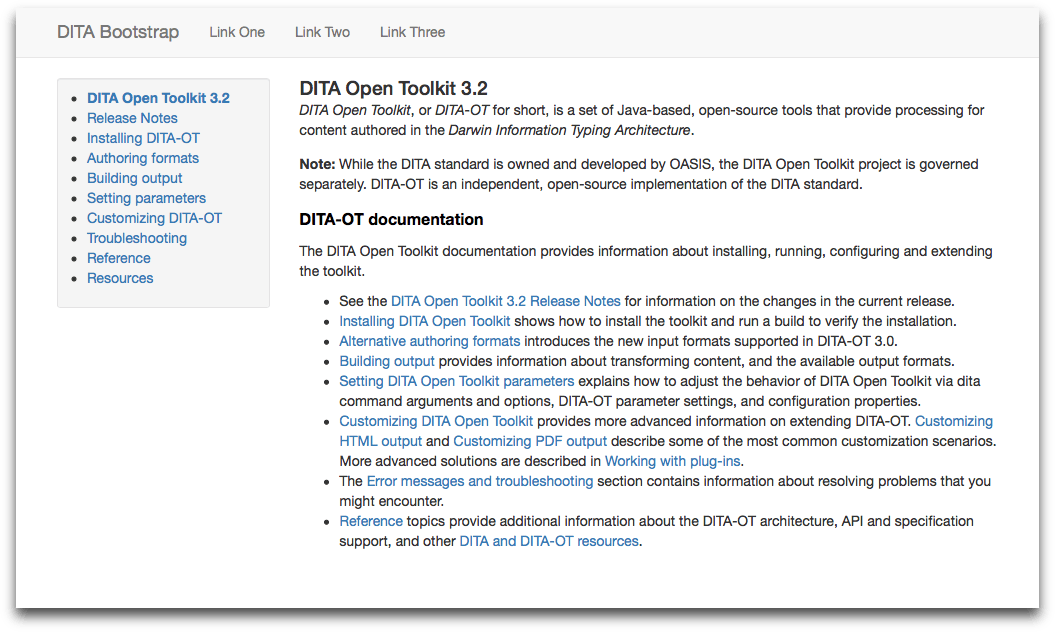
<p>The highlight of the presentation was the announcement of my new <a href="https://github.com/infotexture/dita-bootstrap">“DITA Bootstrap” plug-in</a> for DITA-OT 3.2, which generates HTML5 output with a basic <a href="https://getbootstrap.com/docs/3.3">Bootstrap</a> template that includes responsive grid layout, global navigation menu and a table-of-contents sidebar.</p>

<p><img src="/assets/images/dita-bootstrap-v32-default-viewport.png" alt="DITA Bootstrap plug-in" title="DITA Bootstrap plug-in" /></p>

<p>The global navigation bar at the top is implemented as a custom header file that can be inverted or overridden via the standard DITA-OT <code class="language-plaintext highlighter-rouge">args.hdr</code> parameter setting, and custom CSS.</p>

<h2 id="-plug-in-registry">✨ Plug-in registry</h2>

<p>And thanks to the <a href="https://infotexture.net/2018/11/new-dita-ot-plugin-registry/">new plug-in registry</a> at <a href="https://www.dita-ot.org/plugins">dita-ot.org/plugins</a>, you can now install <strong>DITA Bootstrap</strong> and other plug-ins just by passing their name to the <code class="language-plaintext highlighter-rouge">dita</code> command in DITA-OT 3.2:</p>

<div class="language-bash highlighter-rouge"><div class="highlight"><pre class="highlight"><code>dita <span class="nt">--install</span> net.infotexture.dita-bootstrap
</code></pre></div></div>

<p>So if you’ve struggled to customize the toolkit’s output in the past, you may want to give it another try.</p>

<p>As the number of custom plug-ins in the new registry increases, you may find something there that’s close to what you need, or at least a solid basis for your own customizations.</p>

<p>The more of us that share our plug-in code and publish to the registry, the easier it will be for others to build something new.</p>

<hr />]]></content><author><name>Roger</name></author><category term="DITA" /><category term="Speaking" /><category term="Bootstrap" /><category term="DITA" /><category term="DITA-OT" /><category term="Plugins" /><category term="Registry" /><summary type="html"><![CDATA[At DITA Europe in Rotterdam, I spoke about producing custom output with DITA Open Toolkit and suggested it may no longer be quite as hard as you recall.]]></summary></entry><entry><title type="html">DITA-OT Plug-in Registry</title><link href="https://infotexture.net/2018/11/new-dita-ot-plugin-registry/" rel="alternate" type="text/html" title="DITA-OT Plug-in Registry" /><published>2018-11-04T11:11:11+01:00</published><updated>2018-11-04T11:11:11+01:00</updated><id>https://infotexture.net/2018/11/new-dita-ot-plugin-registry</id><content type="html" xml:base="https://infotexture.net/2018/11/new-dita-ot-plugin-registry/"><![CDATA[<p>At <em>DITA-OT Day</em> in Rotterdam today, we announced the release of <a href="https://www.dita-ot.org/3.2/release-notes/#v3.2">DITA-OT 3.2</a>, which includes support for a plug-in registry that makes it easier to discover and install new plug-ins.</p>

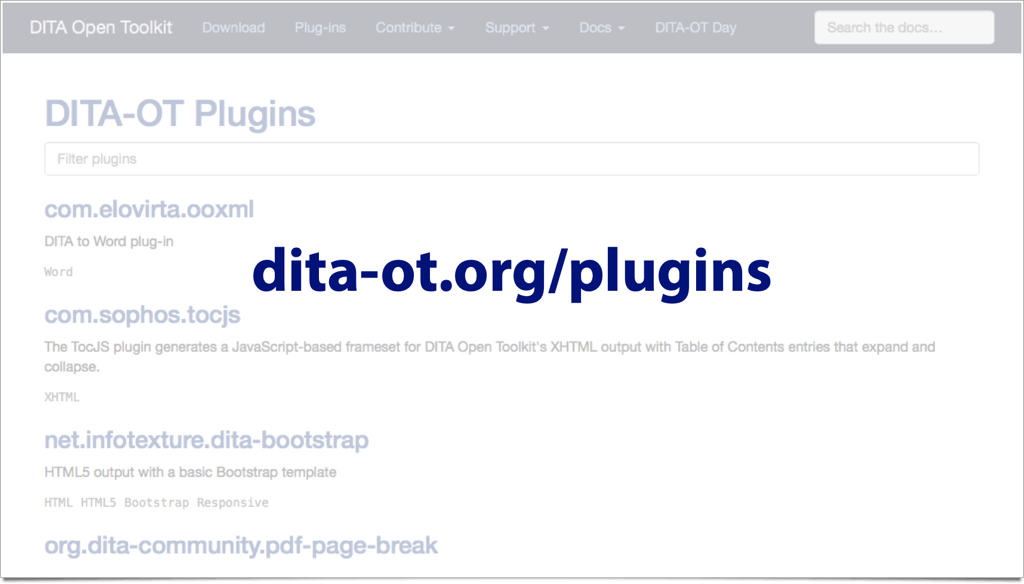
<p>The registry provides a searchable list of plug-ins at <a href="https://www.dita-ot.org/plugins">dita-ot.org/plugins</a>.</p>

<p><img src="/assets/images/dita-ot-org-plugins-slide.png" alt="DITA-OT  plug-in registry" title="DITA-OT  plug-in registry" /></p>

<h2 id="installing-plug-ins-from-the-registry">Installing plug-ins from the registry</h2>

<p>You can now install plug-ins by name via the <code class="language-plaintext highlighter-rouge">dita</code> command, without having to download them first:</p>

<div class="language-bash highlighter-rouge"><div class="highlight"><pre class="highlight"><code>dita <span class="nt">--install</span> net.infotexture.dita-bootstrap
</code></pre></div></div>

<p>The <code class="language-plaintext highlighter-rouge">dita</code> command will connect to the registry and look for a compatible plug-in version, download and install it to your local toolkit installation.</p>

<p>The registry is a Git repository at <a href="https://github.com/dita-ot/registry">github.com/dita-ot/registry</a>. New plug-ins or new versions can be added to the registry by sending a pull request that includes a new plug-in entry in JSON format.</p>

<p>For more information, see “<a href="https://www.dita-ot.org/dev/topics/plugins-registry.html">Adding plug-ins via the registry</a>” in the DITA-OT docs.</p>]]></content><author><name>Roger</name></author><category term="DITA" /><category term="DITA" /><category term="DITA-OT" /><category term="Plugins" /><category term="Registry" /><summary type="html"><![CDATA[DITA-OT 3.2 introduces a new plug-in registry that makes it easier to discover and install new plug-ins via a searchable list at dita-ot.org/plugins.]]></summary></entry><entry><title type="html">DITA-OT³ Markdown Support</title><link href="https://infotexture.net/2017/11/dita-ot-v3-markdown-support/" rel="alternate" type="text/html" title="DITA-OT³ Markdown Support" /><published>2017-11-30T00:00:00+01:00</published><updated>2017-11-30T00:00:00+01:00</updated><id>https://infotexture.net/2017/11/dita-ot-v3-markdown-support</id><content type="html" xml:base="https://infotexture.net/2017/11/dita-ot-v3-markdown-support/"><![CDATA[<p><img src="/assets/images/markdown-dita_800.png" alt="Marking down DITA" title="Marking down DITA" /></p>

<p>One of the most popular posts on this site is <a href="https://infotexture.net/2015/04/dita-ot-markdown-plugin/">Marking Down DITA</a>, my 2015 article on the rise of Markdown as an alternative input method for DITA projects. The sustained interest is at least partly due to its citation in the first <a href="http://docs.oasis-open.org/dita/LwDITA/v1.0/cn01/LwDITA-v1.0-cn01.html">Lightweight DITA committee note</a> on the upcoming standard.</p>

<p>That post provided background information for people who are new to the concept of <a href="https://en.wikipedia.org/wiki/Lightweight_markup_language">lightweight markup languages</a> and how they relate to more structured authoring formats like DITA.</p>

<blockquote>
  <p>— But that was years ago, and a lot has happened since then…</p>
</blockquote>

<p>At this year’s <strong>DITA Europe</strong> conference in Berlin, I gave a follow-up talk that explained how <em>DITA Open Toolkit 3.0</em> supports Markdown right out of the box along with the alternative authoring formats proposed for Lightweight DITA.</p>

<p><em>This article provides a summary of that presentation and highlights recent changes in the toolkit’s Markdown support.</em></p>

<h2 id="using-markdown-with-dita-ot">Using Markdown with DITA-OT</h2>

<p>The level of Markdown support that DITA Open Toolkit provides depends on the version of the toolkit that you are using.</p>

<p>Since I wrote <a href="https://infotexture.net/2015/04/dita-ot-markdown-plugin/">Marking Down DITA</a>, several versions of the <a href="https://github.com/jelovirt/dita-ot-markdown">DITA-OT Markdown</a> plug-in were released to improve Markdown parsing, resolve issues and support additional features, including:</p>

<ul>
  <li>A new <code class="language-plaintext highlighter-rouge">markdown_github</code> transtype generates GitHub-flavored Markdown (GFM), which can be used to publish DITA content to GitHub wikis, or other publishing environments that support GFM.</li>
  <li>Markdown input with multiple first-level headings will now be wrapped in a <code class="language-plaintext highlighter-rouge">&lt;dita&gt;</code> composite topic.</li>
  <li>E-mail autolinks in Markdown input are now generated with the <code class="language-plaintext highlighter-rouge">mailto:</code> URI scheme.</li>
  <li>Strike-through markup in Markdown input is now handled correctly.</li>
  <li>The <code class="language-plaintext highlighter-rouge">md</code> extension can now be used in <code class="language-plaintext highlighter-rouge">@format</code> attribute values to trigger Markdown processing.</li>
  <li>YAML headers are now supported to include metadata in input and output.</li>
</ul>

<h3 id="installing-with-dita-ot-2">Installing with DITA-OT 2</h3>

<p>If you’re still running DITA-OT 2.2 – 2.5, you can install the plug-in as described in my earlier post:</p>

<div class="language-shell highlighter-rouge"><div class="highlight"><pre class="highlight"><code>dita <span class="nt">--install</span> https://github.com/jelovirt/dita-ot-markdown/releases/download/1.3.0/com.elovirta.dita.markdown_1.3.0.zip
</code></pre></div></div>

<h2 id="built-into-dita-ot-3">Built into DITA-OT 3</h2>

<p>The Markdown support that was previously provided by the external <code class="language-plaintext highlighter-rouge">dita-ot-markdown</code> plug-in has been extended and bundled with the default toolkit installation for DITA-OT 3.0.</p>

<p>This means you can now use Markdown topics in DITA publications (or convert DITA source files to Markdown) right out of the box without having to install any additional plug-ins first.</p>

<h2 id="what-about-lightweight-dita">What about Lightweight DITA?</h2>

<p>The new <a href="https://github.com/jelovirt/org.lwdita">Lightweight DITA plug-in</a> replaces the earlier Markdown plug-in and builds on its capabilities to provide additional support for <em>Lightweight DITA</em> (LwDITA).</p>

<h3 id="new-authoring-formats">New Authoring Formats</h3>

<p>DITA Open Toolkit 3.0 provides preview support for the <em>MDITA</em> and <em>HDITA</em> authoring formats planned for LwDITA.</p>

<p>These new formats have been proposed<sup id="fnref:1" role="doc-noteref"><a href="#fn:1" class="footnote" rel="footnote">1</a></sup> as alternative representations of DITA content in Markdown or HTML.</p>

<h3 id="mdita">MDITA</h3>

<p><em>MDITA</em> is the LwDITA authoring format based on Markdown. It is designed for users who want to write structured content with the minimum of overhead, but who also want to take advantage of the reuse mechanisms associated with the DITA standard and the multi-channel publishing afforded by standard DITA tooling.</p>

<p>Recent proposals include two profiles for MDITA:</p>

<ul>
  <li><em>“Core profile”</em> — based on GitHub Flavored Markdown and includes elements that are common to other Markdown implementations.</li>
  <li><em>“Extended profile”</em> — borrows features from other Markdown flavors to represent a broader range of DITA content with existing plain-text syntax conventions.</li>
</ul>

<h4 id="so-whats-the-difference">So what’s the difference?</h4>

<p>The Markdown DITA parser included in the <code class="language-plaintext highlighter-rouge">org.lwdita</code> plug-in provides preliminary support for LwDITA profiles — <em><strong>and</strong> additional Markdown constructs</em>.</p>

<p>To apply LwDITA-specific processing to Markdown topics, set the <code class="language-plaintext highlighter-rouge">@format</code> attribute on a topic reference to <code class="language-plaintext highlighter-rouge">mdita</code>:</p>

<div class="language-xml highlighter-rouge"><div class="highlight"><pre class="highlight"><code><span class="nt">&lt;map&gt;</span>
  <span class="nt">&lt;topicref</span> <span class="na">href=</span><span class="s">"mdita-topic.md"</span> <span class="na">format=</span><span class="s">"mdita"</span><span class="nt">/&gt;</span>
<span class="nt">&lt;/map&gt;</span>
</code></pre></div></div>

<p>In this case, the first paragraph in the topic will be treated as a short description, for example, and additional metadata can be specified for the topic via a YAML front matter block.</p>

<p><strong>Note:</strong> <em>MDITA</em> parsing is stricter than the more lenient document parsing approach that is applied to Markdown documents when the <code class="language-plaintext highlighter-rouge">@format</code> attribute is set to <code class="language-plaintext highlighter-rouge">markdown</code>.</p>

<h3 id="hdita">HDITA</h3>

<p>HDITA is the LwDITA authoring format based on HTML5 to support structured content authoring with tools designed for HTML authoring.</p>

<p>The HDITA parser included in the <code class="language-plaintext highlighter-rouge">org.lwdita</code> plug-in provides preliminary support for these constructs.</p>

<p>To apply LwDITA-specific processing to HTML topics, set the <code class="language-plaintext highlighter-rouge">@format</code> attribute to <code class="language-plaintext highlighter-rouge">hdita</code>:</p>

<div class="language-xml highlighter-rouge"><div class="highlight"><pre class="highlight"><code><span class="nt">&lt;map&gt;</span>
  <span class="nt">&lt;topicref</span> <span class="na">href=</span><span class="s">"hdita-topic.html"</span> <span class="na">format=</span><span class="s">"hdita"</span><span class="nt">/&gt;</span>
<span class="nt">&lt;/map&gt;</span>
</code></pre></div></div>

<h2 id="using-lightweight-dita-now">Using Lightweight DITA now</h2>

<p>So while the Lightweight DITA standard is still evolving, the basic principles are already clear — and DITA-OT³ now offers the processing tools you need to use Markdown in your DITA publishing workflows.</p>

<p>The toolkit’s support for Lightweight DITA will mature further as the emerging standard solidifies, but there’s no need to purchase proprietary software to make it easier for authors to contribute to DITA publications, facilitate review processes with less technical audiences, or feed DITA content into Markdown-based publishing systems.</p>

<p>DITA-OT³ enables a broad range of new use cases, and we can look forward to hearing more about what people are doing with these new capabilities in upcoming conference presentations and future articles — here and elsewhere.</p>

<p><em>Stay tuned…</em></p>

<h2 id="resources">Resources</h2>

<ul>
  <li><a href="https://daringfireball.net/projects/markdown/">daringfireball.net/projects/markdown</a></li>
  <li><a href="https://infotexture.net/2015/04/dita-ot-markdown-plugin/">infotexture.net/2015/04/dita-ot-markdown-plugin</a></li>
  <li><a href="https://github.com/jelovirt/org.lwdita">github.com/jelovirt/org.lwdita</a> <em>(new in DITA-OT 3.0)</em></li>
  <li><a href="https://github.com/jelovirt/dita-ot-markdown/">github.com/jelovirt/dita-ot-markdown</a> <em>(deprecated)</em></li>
</ul>

<hr />

<div class="footnotes" role="doc-endnotes">
  <ol>
    <li id="fn:1" role="doc-endnote">
      <p>See the <a href="http://docs.oasis-open.org/dita/LwDITA/v1.0/cn01/LwDITA-v1.0-cn01.html">Lightweight DITA Committee Note № 1</a> <a href="#fnref:1" class="reversefootnote" role="doc-backlink">&#8617;</a></p>
    </li>
  </ol>
</div>]]></content><author><name>Roger</name></author><category term="DITA" /><category term="Speaking" /><category term="DITA" /><category term="DITA-OT" /><category term="Markdown" /><summary type="html"><![CDATA[As of version 3.0, DITA Open Toolkit supports Markdown out-of-the-box along with the alternative authoring formats proposed for Lightweight DITA.]]></summary></entry><entry><title type="html">DITA Users September Meetup</title><link href="https://infotexture.net/2017/09/dita-users-september-meetup/" rel="alternate" type="text/html" title="DITA Users September Meetup" /><published>2017-09-08T16:14:55+02:00</published><updated>2017-09-08T16:14:55+02:00</updated><id>https://infotexture.net/2017/09/dita-users-september-meetup</id><content type="html" xml:base="https://infotexture.net/2017/09/dita-users-september-meetup/"><![CDATA[<p><img src="/assets/images/dita-users-berlin-meetup_180x180.png" alt="image-left" title="DITA Users Berlin meetup" class="align-left" />
At the next <a href="https://www.meetup.com/DITA-Users-Berlin/events/243187366/">DITA Users Berlin meetup</a> on September 27, Jason Fox will show how HERE Technologies tests and validates DITA docs with their own <a href="https://github.com/heremaps/dita-ot-plugins">open-sourced plugins</a> for <a href="http://www.dita-ot.org">DITA Open Toolkit</a>.</p>

<p>The discussion will cover the design and evolution of the plugins, show how they’re used and configured and how you can integrate the plugins in your own workflows.</p>

<p><a href="https://www.meetup.com/DITA-Users-Berlin">Join us</a> to talk shop and meet other DITA users in the area.</p>

<p>— <em>Hope to see you there!</em></p>]]></content><author><name>Roger</name></author><category term="DITA" /><category term="DITA" /><category term="DITA-OT" /><category term="meetup" /><summary type="html"><![CDATA[Join the DITA Users Berlin meetup on September 27 to learn how HERE Technologies tests and validates DITA docs with open-source plugins for DITA Open Toolkit.]]></summary></entry><entry><title type="html">Teaching Information Architecture</title><link href="https://infotexture.net/2017/05/teaching-information-architecture/" rel="alternate" type="text/html" title="Teaching Information Architecture" /><published>2017-05-20T21:50:30+02:00</published><updated>2017-05-20T21:50:30+02:00</updated><id>https://infotexture.net/2017/05/teaching-information-architecture</id><content type="html" xml:base="https://infotexture.net/2017/05/teaching-information-architecture/"><![CDATA[<p>This spring I’ve been busy teaching an Information Architecture course in the <a href="https://fh-joanneum.at/content-strategie-und-digitale-kommunikation/master/en/programme">Master’s degree program in Content Strategy</a> at FH Joanneum University of Applied Sciences in Graz, Austria.</p>

<p>The course begins by exploring how the principles of placemaking and wayfinding from the physical world apply to digital information systems. As an introduction to the practice of information architecture, the course covers the fundamental concepts of structural design that provide the foundation for shared information environments, including organization schemes, labeling, navigation, and search systems.</p>

<p>Students learn to evaluate existing information systems in practical exercises with public content, applying their knowledge to visualize structure and recommend improvements to support usability, findability, and understanding.</p>

<p>In this semester’s exercises, IA students drafted sitemaps for museum organizations, indexed technical documentation for the <a href="http://www.dita-ot.org">DITA Open Toolkit</a>, proposed navigation refinements for the <a href="https://www.museum-joanneum.at">Universalmuseum Joanneum</a> and analyzed the information architecture of eBay’s German <a href="http://verkaeuferportal.ebay.de">seller center portal</a>.</p>

<p>I’ve been impressed with many of my students’ recommendations in these exercises and I’m confident that some of their suggestions may be incorporated into future iterations of the information systems they analyzed.</p>

<p>These practical applications and the interdisciplinary approach distinguish the Master’s program in Content Strategy at the University of Applied Sciences by providing students with direct access to content industry experts and a broad range of project partners.</p>

<p>The program is now in its third year, and this semester there’s been a strong focus on connecting the content of the courses in Content Auditing, Information Architecture, and User Research and Interaction Design.</p>

<p>In a recent blog post on the university website, <a href="http://writebyte.com">Lisa M. Moore</a> describes <a href="https://fh-joanneum.at/en/blog/project-based-learning-for-content-strategists-a-new-approach-to-the-website-of-the-universalmuseum-joanneum/">how our common project came about</a> and how the related disciplines that comprise an enterprise content strategy can work together to craft a coherent experience.</p>

<p>I am very grateful to Lisa for bringing me into the program, and it’s been a pleasure working with her and <a href="https://www.linkedin.com/in/christopherleeball/">Christopher Lee Ball</a>, Head of User Experience at <a href="https://www.digitaslbi.com">Digitas LBi</a> to bring these courses together.</p>

<p>We’ll be wrapping up our portion of the program next week in London, where students will meet with content teams at Facebook and the UK’s Government Digital Services, and test their prototypes at DLBi’s in-house user testing facilities.</p>

<p>If you’re interested in earning a degree in Content Strategy, the university is <a href="https://fh-joanneum.at/content-strategie-und-digitale-kommunikation/master/en/programme">now accepting applications</a> for the 2017 program.</p>

<p> </p>]]></content><author><name>Roger</name></author><category term="Featured" /><category term="Teaching" /><category term="Information Architecture" /><summary type="html"><![CDATA[This spring I’m teaching Information Architecture in the Master’s degree program in Content Strategy at FH Joanneum University of Applied Sciences in Graz.]]></summary></entry><entry><title type="html">DITA Open Toolkit Docs Process</title><link href="https://infotexture.net/2016/11/dita-open-toolkit-documentation-process/" rel="alternate" type="text/html" title="DITA Open Toolkit Docs Process" /><published>2016-11-14T11:30:55+01:00</published><updated>2016-11-14T11:30:55+01:00</updated><id>https://infotexture.net/2016/11/dita-open-toolkit-documentation-process</id><content type="html" xml:base="https://infotexture.net/2016/11/dita-open-toolkit-documentation-process/"><![CDATA[<p>At this year’s <a href="https://ditaeurope.infomanagementcenter.com">DITA Europe</a> conference in Munich, I’ll be speaking about how the DITA Open Toolkit project uses DITA features and other open-source tools like Git, Gradle, Jekyll and Travis to build the toolkit documentation included in distribution builds and published on the project website at <a href="http://www.dita-ot.org">dita-ot.org</a>.</p>

<p>By exploring how the <a href="http://www.dita-ot.org/dev/">DITA-OT docs</a> are built, participants will see examples of recent DITA features in action, learn more about how the toolkit works, what they need to know to contribute to the project, and consider techniques that may be applicable to their own publishing projects.</p>

<p>Join us to learn how the DITA-OT project uses open-source tools and modern development techniques to publish the docs, including:</p>

<ol>
  <li>Version control &amp; collaboration
    <ul>
      <li><a href="https://git-scm.com">Git</a> for distributed version control and content management</li>
      <li><a href="http://nvie.com/posts/a-successful-git-branching-model/">Git Flow</a> branching strategy <em>(master, develop, feature, release, hotfix)</em></li>
      <li>Collaboration via <a href="https://github.com">GitHub</a> <em>(issues, pull requests, project boards, wiki)</em></li>
    </ul>
  </li>
  <li>Sample DITA features used in the docs
    <ul>
      <li>profiling and (branch) filtering <em>(expert/novice content)</em></li>
      <li>keys and key references</li>
      <li>subjectScheme classification for controlling available attributes</li>
      <li>extending topics with conref push</li>
      <li>XML mention domain</li>
    </ul>
  </li>
  <li>Automatically generating topics from source code with Ant &amp; XSLT</li>
  <li>Continuous integration
    <ul>
      <li>Local testing via <a href="http://gradle.org" title="Gradle · Modern Open-Source Enterprise Build Automation">Gradle</a>’s <code class="language-plaintext highlighter-rouge">--continuous</code> builds</li>
      <li><a href="https://travis-ci.org">Travis CI</a> builds for each push to <code class="language-plaintext highlighter-rouge">develop</code></li>
    </ul>
  </li>
  <li>Building the project website
    <ul>
      <li>Combining source files in DITA &amp; <a href="http://daringfireball.net/projects/markdown/">Markdown</a></li>
      <li><a href="http://jekyllrb.com" title="Jekyll • Simple, blog-aware, static sites">Jekyll</a> static site generator</li>
      <li><a href="https://github.com/Shopify/liquid/wiki">Liquid</a> templating</li>
      <li><a href="https://pages.github.com">GitHub Pages</a> for hosting</li>
      <li><a href="http://getbootstrap.com">Bootstrap</a> for layout &amp; presentation</li>
      <li><a href="http://sass-lang.com" title="Sass: Syntactically Awesome Style Sheets">Sass</a> for styling</li>
    </ul>
  </li>
</ol>

<p>The slides are available on <a href="https://speakerdeck.com/infotexture/dita-open-toolkit-docs-process">Speaker Deck</a>, and embedded here for convenience:</p>

<script async="" class="speakerdeck-embed" data-id="5c4a9f2168dc4362ba06b37e48ec861a" data-ratio="1.33333333333333" src="//speakerdeck.com/assets/embed.js"></script>]]></content><author><name>Roger</name></author><category term="DITA" /><category term="Speaking" /><category term="DITA" /><category term="DITA-OT" /><category term="documentation" /><summary type="html"><![CDATA[At DITA Europe this year, I'll be speaking about how the DITA Open Toolkit project uses DITA features and open-source tools to build the toolkit documentation.]]></summary></entry><entry><title type="html">API docs in DITA and Markdown</title><link href="https://infotexture.net/2016/03/api-docs-in-dita-and-markdown/" rel="alternate" type="text/html" title="API docs in DITA and Markdown" /><published>2016-03-05T00:23:23+01:00</published><updated>2016-03-05T00:23:23+01:00</updated><id>https://infotexture.net/2016/03/api-docs-in-dita-and-markdown</id><content type="html" xml:base="https://infotexture.net/2016/03/api-docs-in-dita-and-markdown/"><![CDATA[<p><img src="/assets/images/write-the-docs_180x180.png" alt="image-left" title="Write The Docs" class="align-left" />
I was recently invited to speak in London at the <a href="http://www.writethedocs.org">Write The Docs</a> mini-conference on <a href="http://www.meetup.com/Write-The-Docs-London/events/228403383/">Documenting APIs</a> hosted by the UK’s Government Digital Service, the team behind the <a href="https://www.gov.uk">GOV.UK</a> website.</p>

<p>This all-day event featured presentations on API design and documentation solutions like <a href="https://apiblueprint.org">API Blueprint</a>, the RESTful API Modeling Language (<a href="http://raml.org">RAML</a>), and the Open API Initiative <em>(formerly known as <a href="http://swagger.io/introducing-the-open-api-initiative/">Swagger</a>)</em>. The day began with a look at the needs of API documentation users and how API docs differ from other forms of technical communication. The afternoon continued with a series of lightning talks and case studies on various approaches to documenting APIs.</p>

<p>In my talk I proposed a hybrid approach to API documentation that combines Markdown output generated by API docs tools with more complex content authored in DITA and published via the <a href="https://github.com/jelovirt/dita-ot-markdown">DITA-OT Markdown plug-in</a> for delivery via <a href="https://www.gitbook.com">GitBook</a> or other Markdown-based publishing systems.</p>

<p>The slides are available on <a href="https://speakerdeck.com/infotexture/api-docs-in-dita-and-markdown">Speaker Deck</a>, and embedded below for convenience.</p>

<p>Judging by the level of interest and lively discussions, I think we can look forward to more opportunities to bring technical communication experts and developers together, and build on the knowledge and tools we have to produce better API docs.</p>

<script async="" class="speakerdeck-embed" data-id="3d3f520c2e504282b9af8f3a67fc1882" data-ratio="1.33333333333333" src="//speakerdeck.com/assets/embed.js"></script>]]></content><author><name>Roger</name></author><category term="DITA" /><category term="Speaking" /><category term="API" /><category term="DITA" /><category term="docs" /><category term="Markdown" /><summary type="html"><![CDATA[I spoke in London at the Write The Docs mini-conference on Documenting APIs hosted by the UK’s Government Digital Service, the team behind the GOV.UK website.]]></summary></entry></feed>